Obtaining an AppID
Every 10x Resume enquiry requires a Userbase App ID.
If you do not have one, you may obtain one from the Userbase website:
The instructions and screens below are to help you with the setup process.
While 10x Resume is an application which uses Userbase, it is otherwise unaffiliated.
Please note
- You do not need a distinct App ID for each enquiry.
- You are free to use the same App ID for as many enquiries as you like.
- You are responsible for your Userbase App ID and account and
agree to abide by the Userbase terms of service ↗︎. - You may edit, update or delete your account from the Userbase edit account ↗︎ page.
- You will need a Userbase subscription if you exceed the limits of the Starter plan.
Creating a new admin account on Userbase
Steps
-
When you press the Click here to obtain a new App ID button above your browser should open a new window.
You will be prompted for a name, email and password as shown below
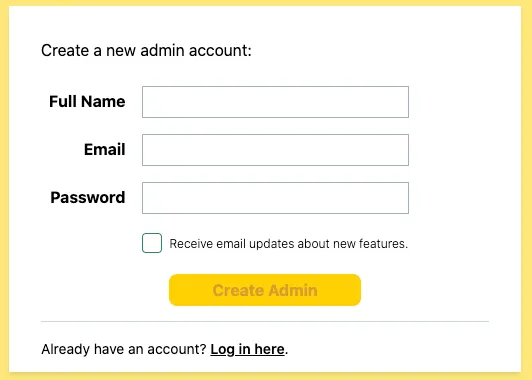
If you are already logged into your account you will instead see your Userbase Admin Panel
-
Provide the values and press Create Admin.
Userbase Admin Panel
Your App ID will be shown in the Userbase Admin panel after you press Create Admin:
Steps
-
Record the App ID of the Starter App:
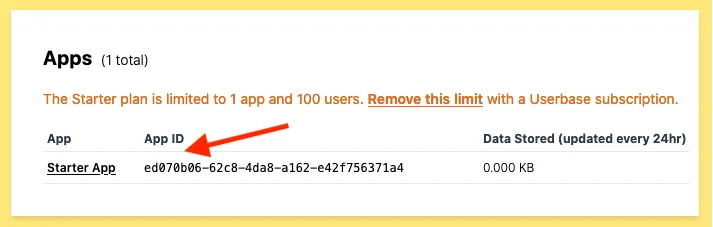
You can use the App ID of the Starter App for your 10x Resume enquiry.